
Image: Sumaid pal Singh Bakshi on Unsplash
Technical SEO is your site's plumbing that dictates how pages connect, how fast they load, and whether search bots can actually find what you've built. Get this wrong, and nothing else matters. Your brilliant content sits in the dark. Your expensive links point to nowhere useful.
Plenty of sites collapse because someone misses the basics. What if a routine site update accidentally adds a noindex tag to high-intent landing pages? Search traffic will disappear, and leads will dry up.
The game keeps changing, too. Google swapped FID for INP in their Core Web Vitals. Mobile-first indexing isn't optional anymore.
In this guide, you’ll learn how to spot structural and technical issues and how to fix them before they compound.
We’ll break down:
- how to design site architecture that search engines can actually understand,
- how to improve speed without chasing vanity scores, and
- how to make sure your most important pages are crawled, indexed, and prioritized correctly.
Understanding website architecture
Website architecture shapes how users move through your site and how search engines interpret its importance. When that structure is unclear, even strong content can struggle to perform.
This loss of visibility isn’t unique to websites. Any complex system becomes harder to manage once it scales without clear signals showing what is working and what isn’t.
The same challenge shows up when organizations try to evaluate AI ROI for enterprise, where usage spreads across teams faster than measurement frameworks can keep up. Without structure and clarity, decision-making breaks down in predictable ways.
Components of optimal website architecture
Your site architecture is basically a map. How do people get from your homepage to that blog post from 2019? Can Google figure out which pages matter most?
The following are core components that make a site easy to navigate, easy to crawl, and easy to scale as it grows.
URLs
Keep URLs short and readable. Nobody needs to see /category/subcategory/sub-subcategory/year/month/day/post-title-here-version-2-final-final.
Just use /blog/post-title and move on. Pick hyphens or underscores and stick with them.
Internal links
Internal linking is how authority flows through a site. Pages that drive revenue or conversions should never exist in isolation.
A hub-and-spoke structure works well for most sites. High-level category or hub pages link down to related subpages, such as products, services, or articles.
Those subpages link laterally to related content and back up to their parent categories. This creates clear pathways and reinforces topical relationships.
Anchor text should be descriptive and contextual, helping both users and search engines understand what the linked page is about.
Sitemaps
Your XML sitemap isn't a dumping ground. Include pages you actually want indexed. Update it when things change.
Split massive sites into multiple sitemaps. Google's limit is 50,000 URLs per file, so use it wisely. And yes, an HTML sitemap still helps users who get lost.
Here’s what IKEA’s sitemap looks like.
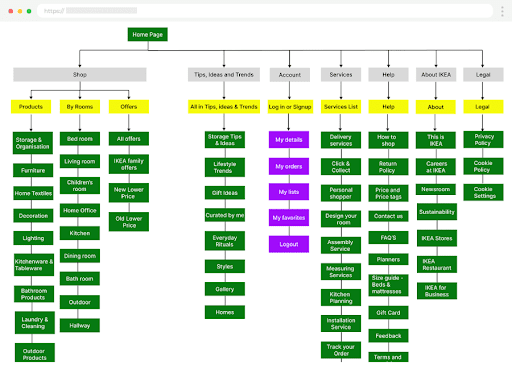
Image: htmlBurger
Clear sitemaps like Home > Products > Shoes > Running > Men's Trail Runners tells your user exactly where they are. Mark these up with schema so Google shows them in results. It's free real estate in the SERPs.
Common architectural mistakes to avoid
Here are certain structural issues that show up again and again:
- Sites where critical content sits five or six clicks from the homepage almost always struggle. If nothing valuable exists beyond level two, link equity gets diluted, and users drop off before they ever reach what matters. If content requires effort to find, it’s already underperforming.
- Redirects should be clean and intentional. When Page A redirects to B, then C, then D, crawl efficiency drops and page speed suffers. Every extra hop introduces risk. Whenever possible, redirect straight from the original URL to the final destination.
- Pages without internal links are effectively invisible. They receive no authority, are harder to crawl, and often fail to rank. Every indexable page should be reachable through at least one logical internal path.
- Filters like color=red, size=large, and price=50-100 can quickly explode into thousands or millions of low-value URLs. Left unchecked, this wastes crawl budget and creates duplication. Block non-essential parameter combinations, and use canonical tags to consolidate the rest.
- Menus or links that rely on hover states or complex JavaScript interactions often fail to render consistently for crawlers. If navigation isn’t built with standard HTML links as a foundation, key pages may never be discovered. Accessibility and crawlability should always come before visual flair.
Enhancing website speed
Remember dial-up? Nobody else does either. People expect everything instantly.
Amazon figured out that every 100ms of latency costs them 1% in sales. Delays increase bounce rates, and you lose the sale.
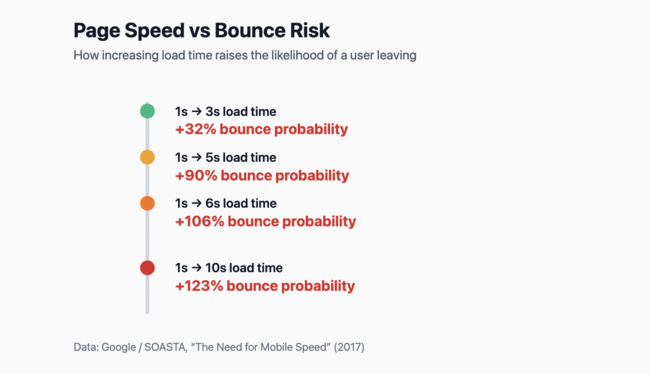
Google made it official with Core Web Vitals. They want your biggest element to load in under 2.5 seconds (LCP), your page to respond to clicks in under 200ms (INP), and your layout to stop jumping around (CLS under 0.1).
Techniques to improve website speed
Start with the obvious stuff:
- Compress files aggressively, switch to modern formats like WebP or AVIF, serve responsive image sizes, and lazy-load anything below the fold.
- Audit third-party scripts, defer non-critical code, and remove tools that no longer serve a clear purpose.
- Inline critical CSS for above-the-fold content and strip unused styles so the rest loads later without blocking rendering.
- Use HTTP/2, preconnect to required third-party domains, deliver assets through a CDN, and enable Brotli compression.
- Optimize database queries, cache aggressively, and keep time to first byte under 600ms to avoid starting every page load at a disadvantage.
You can also use the following tools:
- PageSpeed Insights shows what real users experience via Chrome UX Report data, plus lab diagnostics for debugging. Use it for the big picture.
- Lighthouse runs synthetic tests in Chrome DevTools. Great for catching regressions before they hit production.
- WebPageTest gives you filmstrips, waterfalls, and more data than you'll know what to do with. Perfect for tracking down that one slow third-party script.
- For quick checks, GTmetrix and Pingdom work fine. They're less detailed but easier to share with non-technical folks.
For quick diagnostics, a free seo checker like Backlinko's can surface common technical and performance issues before deeper audits. It’s especially useful for catching obvious problems like missing metadata, blocked resources, or slow-loading pages that affect multiple URLs. This kind of high-level scan helps teams prioritize where to investigate further instead of guessing.
Improving crawlability and indexability
Crawlability means bots can reach your pages. Indexability means they'll actually show those pages in results. You need both.
Hhere's how to improve crawlability:
- Don't block CSS and JavaScript unless you want Google to render your site like it's 1999. Block actual junk: internal search results with a million combinations, user profiles nobody searches for, admin sections that shouldn't exist.
- Test everything in Search Console. That one typo could block your entire site.
- Use actual `<a href>` tags. Not divs with onclick handlers. Not buttons that navigate via JavaScript. Real, honest-to-goodness links that work when JavaScript fails.
- 200 means the page exists. 404 means it's gone. 301 means it moved permanently. Don't return 200 for your custom 404 page. Tthat’s not going to work.
- See what Googlebot actually crawls versus what you want crawled. Adjust internal linking to guide bots toward valuable content.
Pairing crawl data with basic demand checks helps avoid wasted effort. Quick checks can provide rapid validation before crawl budget is committed.
If there are pages on your site that cannot be crawled, here’s what that will look like:
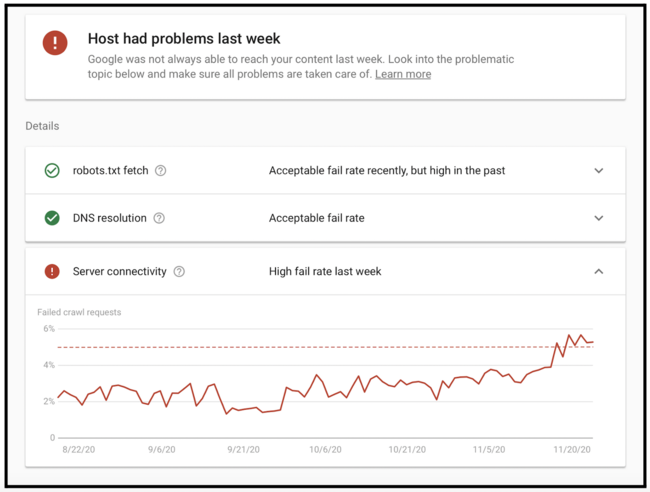
Image: Google
Here’s how to enhance indexability:
- Got the same product in three categories? Pick one URL as canonical. Link to that version internally. Let the others exist, but point to the chosen one. This concentrates your ranking signals instead of splitting them.
- Use noindex on pages that shouldn't rank: thank you pages, internal search results, and thin category pages with one product. But remember, long-term noindex can reduce crawling of links on that page.
- You can't trick Google into indexing garbage. Thin content, duplicate content, auto-generated content, they see through it. Make pages worth indexing, or accept they won't be.
- Running the same content in multiple countries? Hreflang tags prevent duplicate content issues while helping the right version rank in the right place. Get these wrong and watch your UK content rank in Australia.
Technical SEO tools for 2026
The right tools turn impossible tasks into routine work.
- Screaming Frog remains the Swiss Army knife of technical SEO. Runs on your desktop, crawls like Googlebot, renders JavaScript, extracts anything via XPath.
- Sitebulb makes beautiful reports that clients actually understand. The hints system catches issues I might miss. More expensive, but saves time explaining problems.
- For enterprise sites, cloud crawlers like JetOctopus or Lumar handle millions of URLs without melting your laptop. They also integrate log file analysis to show what search engines actually crawl versus what exists.
- For monitoring, Google Search Console is mandatory. Free data straight from Google about indexing, rankings, and errors. Bing Webmaster Tools is worth setting up, too.
- If you’re paying for SEO tools already, it’s worth checking if they also offer site free site audits among their range of tools.
Final note
The sites crushing it in 2026 will nail the basics while everyone else chases shiny objects.
Start with a crawl. Fix what's obviously broken. Make it faster. Make sure search engines can find and understand your important pages. Rinse and repeat every quarter.
The web keeps evolving, but the principles stay the same: build for humans, make it easy for bots, and keep everything running smoothly. Do that, and you'll outrank sites with twice your budget and half your sense.
Want more? Wordtracker's got guides on keyword research and content strategy that build on these technical foundations. Because fast, crawlable sites still need something worth crawling.