Image source: Freepik
Site architecture is simply the way your web pages are interconnected through a URL structure, navigation, and internal linking. That’s the textbook definition and it all sounds very organised and logical. However, what you will generally be dealing with is an existing website where key pages are hidden, categories don’t represent how users search on your site, and internal linking has gone a bit awry.
You’ll usually notice it when things don’t add up. A page may be getting impressions in Search Console but is barely linked anywhere internally. Or a category page exists, but all the authority is going to random blog posts instead. This means your site architecture needs taking in hand, and this is where keyword mapping comes in.
Usually used as a planning tool, keyword mapping can also help you decide what to keep and what to lose. Every page needs a clear role and if you can’t say what search query it’s meant to win, it probably shouldn’t exist in its current form.
In this article we’ll show you how to audit your site architecture with keyword maps.
Understanding site architecture
Many audit frameworks seem straightforward: crawl the site; pull performance data; map keywords; fix gaps.
The actual process is much more complicated as the data are often at odds with each other.
Here are some possible scenarios:
- You see a page ranking for queries it was never intended to rank for. On the flip side, you'll also see pages that were specifically targeted for those searches but invisible.
- You see many instances of duplicate URLs (all trying to compete for the same intent) and find areas of the site that have been built out over time and have no real organizational structure.
So the first step in auditing is to understand what you're working with. What are your primary pages? How are they structured? More importantly, does the current structure of your site match how users are searching?
If you take a look at the breakdown of architecture, it is generally defined by three components: URL structure, navigation, and internal linking.
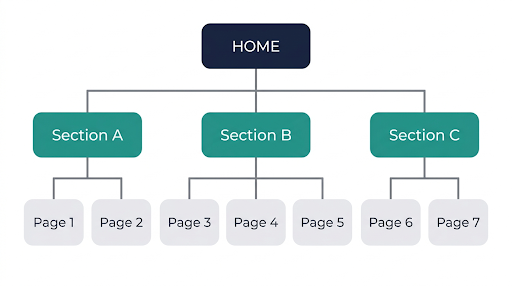
Image generated with AI
While URL structure provides clarity and navigation allows users to navigate and orient themselves, it’s really the internal linking that does the heavy lifting in distributing context throughout a site. It decides which pages will receive reinforcement and which will slowly become forgotten. This can easily be seen in a crawl.
Some pages will naturally draw links due to their inclusion in menus or templates. Other pages may be technically "live", yet they are disconnected with no clear path to access. Over time, these pages will lose relevance and perform poorly, regardless of the quality of the content.
Look for these common patterns when auditing a site.
- Click depth: Pages that are important are often located four to five clicks away from the home page, which is too far. Not impossible to rank for, but certainly more difficult than necessary.
- Orphan pages: These are easy to miss as they do not cause problems visually. They simply are not reinforced by the remainder of the site.
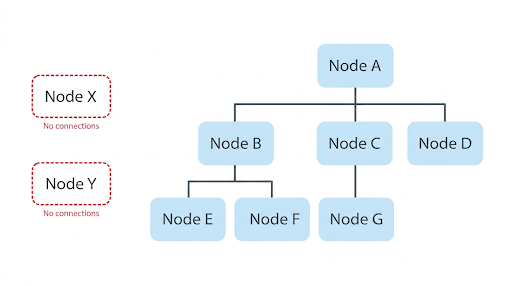
Image generated with AI
- Duplication: When viewed individually, these pages are fine, but combined, they dilute the overall site structure.
- Inconsistency: Categories are named differently within the navigation, are different within URLs, and possibly something completely different within page titles. This lack of consistency has a negative effect on everything.
This becomes more obvious on local service sites. You’ll see pages targeting something like a St Louis electrician, but the way that page is labeled across the site doesn’t match.
The URL might reflect the location, the navigation might group it under a generic service category, and the internal links use completely different phrasing. That inconsistency makes it harder to reinforce what the page is actually supposed to rank for.
The important part here is cross-referencing.
If a page is getting traffic in Search Console but appears isolated in your crawl, it likely needs stronger internal links. If multiple URLs are targeting the same intent, you need to consolidate or reposition them. Otherwise, you’re splitting signals across pages that should be working together.
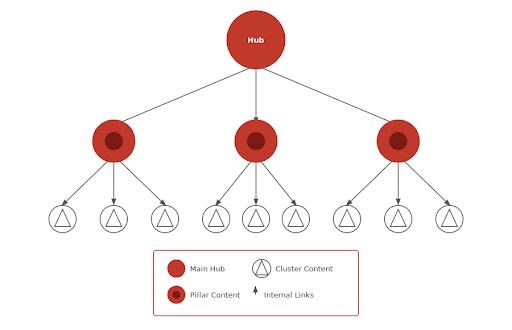
Image generated with AI
Most structural problems come down to two things. Either the hierarchy doesn’t match how people search, or the site has created too many overlapping paths.
Where does keyword mapping come in?
Keyword mapping assigns keywords to pages and adds necessary definition to your structure.
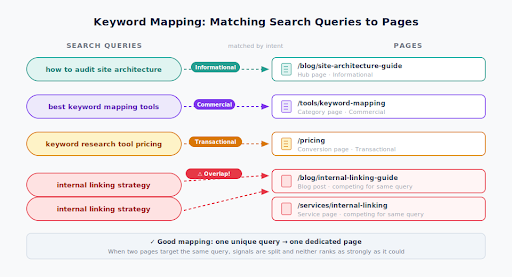
Image generated with AI
Theoretically, keyword mapping involves taking an intended target query and matching it to a corresponding page based on its intent. You can also use keyword mapping to resolve the issue of overlap when you’re auditing.
Your website could have two or more pages attempting to rank for the same topic.
Maybe two separate guides were created at different times. Another example would be a category page and a blog post attempting to rank for the same commercial query. Product pages may also unintentionally compete with informational content.
It gets more complicated when auditing sites that have multiple types of services. For example, a page focused on dual diagnosis treatment should be easily separated from a page focused on mental health or a page focused on addiction, but still part of the same overall structure.
Often audits show that these lines of separation are not clearly defined. There will be overlapping content, mixed intent, and pages competing against one another rather than supporting each other.
Once you have cleaned it up, every page will have a defined function, not a general subject area. Each page will have a specific purpose as it relates to a specific type of search.
Creating and optimizing keyword maps
On paper, the process of mapping your website's content to user intent is simple.
You create a chart. URL, page type, main keyword, intent, supporting terms, current performance, and notes.
The challenge comes with assigning intent to each level of your website's structure.
- Broad search terms will generally live on your "hub" pages.
- More specific search terms will typically be housed on subcategory or guide-type pages.
- Transactional searches will reside on pages that are specifically built to drive conversion.
Problems can arise when there are too many pages competing for the same layer of intent.
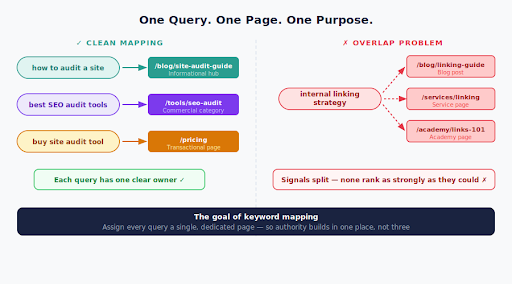
Image generated with AI
Maybe two pages are partially ranking, but neither of them is fully ranking. It also happens when a page begins to rank for searches that were not intended to be ranked for because there is no better fit for that layer of intent on your website.
This is clearer when dealing with high-intent topics. A high-intent topic like how to hire an executive assistant should ideally reside on a single page that is positioned close to conversion. However, often that intent has been split between a guide, a service page, and a generic blog page. As a result, none of them rank as strongly as they could because the signals are diluted across multiple URLs.
The solution to this problem is to tighten the focus of each page.
Just changing each page's on-page elements to support that effort addresses the issue but doesn't consider the broader picture. You can put keywords in your title tags and header tags, but if the overall structure does not support the intent you're trying to signal, the strength of the signals remains weak.
Which means you will have to continually refine your map of content to user intent.
Integrating keyword maps with site architecture
This is the part where things can either come together or fall apart. You can have a clean keyword map, but if the site structure doesn’t reflect it, the impact will be limited.
Integration means aligning internal links and hierarchy with the mapped intent.
Hub pages link down to their supporting pages in a way that reflects the topic. Supporting pages link back up and across where it makes sense. Not excessively, but with intent behind each connection.
You’re creating paths that guide both users and search engines through related content.
Breadcrumbs and consistent navigation help reinforce that structure. But internal links inside the content itself are what make the connections feel natural.
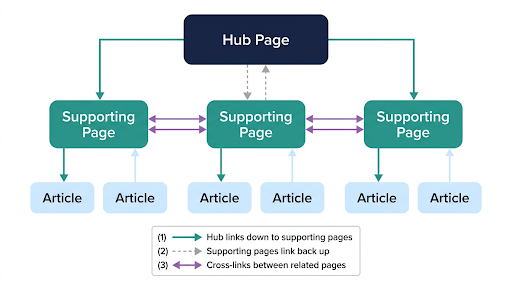
Image generated with AI
When this is done well, pages start to support each other instead of competing.
You see broader query coverage. More stable rankings. Clearer signals about which pages matter for which topics.
Common pitfalls and how to avoid them
There are certain issues which come up almost every time.
- Cannibalization is one of the biggest. Multiple pages targeting the same query, splitting relevance instead of consolidating it. Fixing it usually means merging content, redirecting URLs, or clearly redefining each page’s role.
- Faceted navigation is another. Filters create endless combinations of URLs that don’t add value. These need to be controlled, either through canonicalization, crawl rules, or limiting what gets indexed.
- Orphaned content is simpler but just as common. If a page matters, it needs to be connected to the rest of the site through meaningful links.
- Then there’s over-optimization. Forcing exact-match anchors everywhere, creating unnatural patterns. It doesn’t help, and it often weakens the overall structure.
- Search intent shifts are less obvious but just as important. A page that used to match the SERP may no longer fit. When that happens, small edits won’t fix it. You either adjust the page or create a better match.
A good approach is to assess whether there are clear indications of matching intent.
For example, if you were writing a guide about how to create a direct booking website (mid-funnel), then that guide should likely reside as a focused resource, and not under a broad category, such as your blog.
It should also not be competing against a page titled for example Vacation Rentals. When a user’s intent is being served by many URLs, none of those URLs can provide complete coverage of their intent.
What to do next
Once you’ve aligned structure and mapping, you’ll find that things start to make more sense. You can see which pages matter, how they connect, and where gaps exist.
That’s the start, but it’s a continuing process of work.
New pages get added. Old ones lose relevance. Internal links drift as content grows. So you have to revisit it regularly enough to catch issues before they compound.
If you want to go deeper on keyword research and mapping workflows, Wordtracker has a solid set of tools and resources worth exploring.