According to Copyblogger:
On average, 8 out of 10 people will read headline copy, but only 2 out of 10 will read the rest. This is the secret to the power of your title, and why it so highly determines the effectiveness of the entire piece.
Our step-by-step guide is the perfect starting point and an essential reference if you’re ready to up your headline game and write catching titles that encourage click throughs and shares.
Step 1: Know your audience
Knowing your audience is an absolutely essential foundation for writing a great headline. If you have audience or customer personas created already, you should have a very clear idea of who your audience is. If not, you have some prep work to do before you can write a headline that really resonates with your readers. Depending on the type of content you’re creating, your audience might shift. A blog post could be targeted at a very specific portion of your customers or target customers, while you might send an email shot to every single customer you have ever had.
Knowing who is going to read the final piece, whether that’s a blog, an ebook, an infographic or an email newsletter is your very first step towards writing an engaging headline or title. Once you know who you’re talking to, you can move on to figuring out how to truly connect with them and write a headline that entices them to read more, click through, forward or share your content.
Step 2: Draft a rough title
A rough title isn’t the same as your final title or headline. This is a working headline which keeps you on track as you write the piece. Refer back to it as you create your copy to make sure your blog or article stays on track and is true to your initial vision of what that piece of content is about.
You don’t need to be clever or witty here or spend hours crafting, shaping and cajoling words into a format that you’re happy with. Think of it as a work in progress or mile marker on the way to the final destination. A rough title for this post might have been:
- Writing an interesting title
- Steps for writing a catchy headline
- How to write a headline
- Intro to writing a strong headline
- X steps for better headlines
None of them are the finished product but they all encapsulate what the article is about, provide a jumping off point and act as a handy check to ensure the content is staying on track. The last thing you want is to spend hours on a headline only to find that your content doesn’t live up to its catchy billing.
Step 3: Finish your content first
It sounds counterintuitive to write an article or piece of content before deciding on a headline or title but, this is actually a much easier way to work. Once you have your working title down, you’re free to concentrate on what you actually want to say. When that’s done, you have a finished product that you can build a title around.
Your catchy headline needs to genuinely reflect what’s included within the content, otherwise it’s simply click bait. With that in mind, it follows that you can only write a catchy headline that lives up to its promise when you have a finished piece of copy to review.
Armed with your blog post, email shot or article, you now need to think of a way to attractively title or encapsulate your content in a few words. This is your headline. It transmits what the reader can expect in an attractive, compelling and honest way.
Step 4: Think useful
Before you get into the mechanics of your catchy headline, you need to think about what knowledge, information or entertainment value you want to convey with your piece of content. This is its purpose. We all turn to Google or the web as a whole because we want something. Whether that’s to be informed, entertained or to get help doing something (such as writing a better headline), there is a purpose behind our search. Identify this purpose and you can start to be useful.
Useful headlines are catchy and enticing because they solve a problem, signifying to the reader that their search is over. Determine how your piece of content is useful – does it help the reader reduce their energy bills? Lose weight? Master a tricky cooking technique? It is going to brighten up their dull Monday with a laugh out loud story or video? Give the reader easy ways to improve their social media posts? Suggest a can’t miss vacation destination or pass time on a long commute? Whatever the purpose of your content, this usefulness is a key point to convey in the headline. Identify that and you have the first building block for a catchy title at your fingertips.
Step 5: Use data
You should have a few work-in-progress headlines for your piece noted down. Now it’s time to get scientific. There are two steps to this part of the process – using keywords and split testing. Working keywords into your headline is a critical part of writing an attention-grabber because the keyword signifies your piece of content matches with the searcher’s or user’s intent. This makes a click through more likely and automatically makes the headline appear more relevant.
You can use the Wordtracker keyword tool to identify the most relevant and most popular keywords within your niche, as well as identifying the questions people are asking online to help with headline ideas. Keywords can be slotted into your working headlines to help create one or two optimized possibilities.
The second stage once you have crunched your keyword data and inserted into your shortlisted headlines is to do some A/B testing. If you regularly send out email newsletters or use paid search, you’ll probably have done A/B testing for landing pages and email subject lines to help identify the best converting option. The same can be done with headline testing.
A number of tools exist to help you conduct A/B headline testing. If you’re a Wordpress user, you can try the Title Experiments plugin which automates A/B split title testing for a post to discover which gets more page views and better click through rates. The plugin displays multiple versions of the post title or headline randomly, so various options can be tested to give a wealth of useful data.
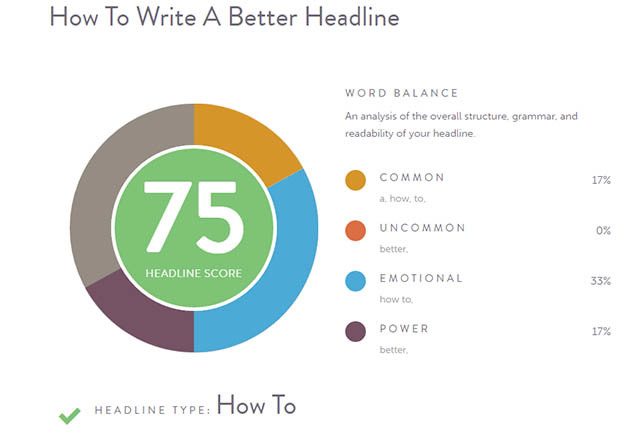
Another popular tool is CoSchedule’s Headline Analyzer, which can be used online – simply type your headline in and it will analyze for you with a score out of 100 and tips to improve it. There's also the Advanced Marketing Institute tool which will analyze your headline to determine emotional value.
For email headlines, platforms such as Mailchimp typically have A/B testing functionality built-in. Use these to test two or more variations of your headline or subject line on a small pool of subscribers before carrying out your main send.
Repeat these steps and tweak your headline as needed to get catchy, compelling titles that do your content justice.