The process is pretty simple - first identify which keywords are relevant to your website, which ones go on which pages, and finally place them on page as well as in the body copy itself through the use of various HTML elements. Through this process you can optimise the placement of keywords, resulting in a site that performs better than a non-optimised site in the search results.
However, sometimes understanding the language that your customers use can be difficult as people don't typically search for things in the same way they would ask for them. This is why a keyword research tool can be pretty handy. It shows the searches people are actually making, using the keywords you need to use.
Wordtracker offers a free 7 day trial. Using this you can not only identify the terminology which your audience uses to search, but also additional keywords to optimise existing traffic.

First steps
Start off with the broadest terms which describe your product or service and then refine these down to make them increasingly relevant. This can be done on a single page or throughout the website, starting with the broadest terms on the top level pages and refining down to the most exact terms on the low level pages. A great way to understand this process is through the buying cycle.
Site structure and keywords
A good site structure is like a triangle, or pyramid, with the single homepage on top then an increasing number of pages as you move through the site.
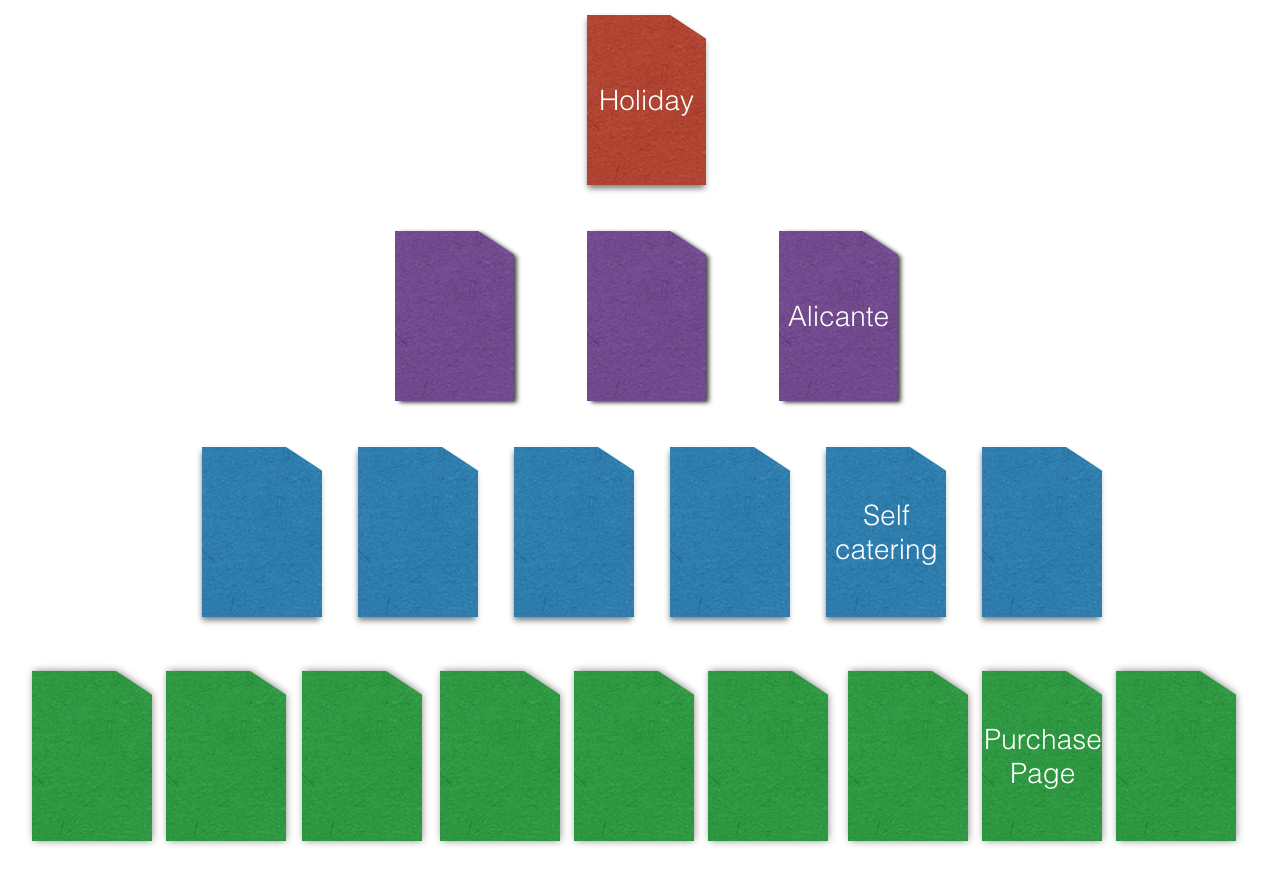
You have your home page at the top, and this is probably the least focused page on your website. It’s not tied to any specific product or service (unless you only sell one), and will tend to attract the broadest audience. As you progress through the site the types of content and keywords you are targeting will become more refined as the consumer gets closer to a purchase. The sales pages are typically at the lowest level of the site.
This is where the buying cycle comes in.
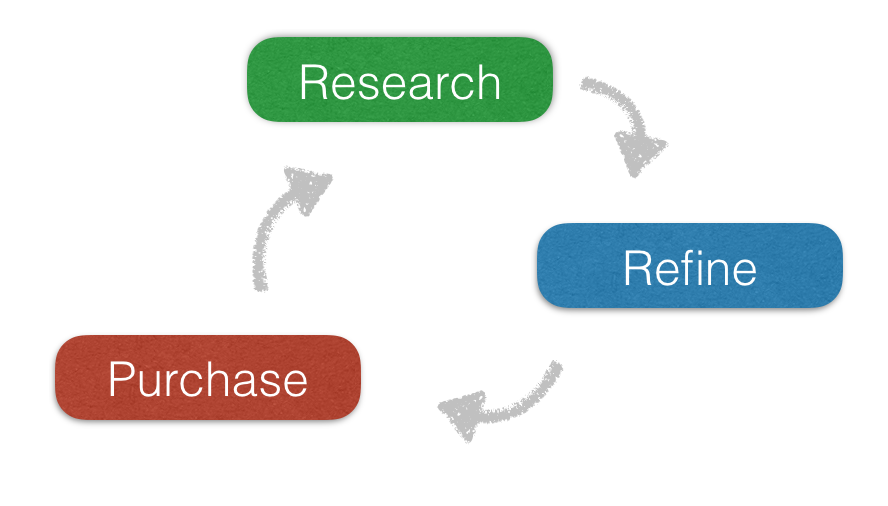
1. Research: When the customer first starts to look for a solution 2. Refine: This is when the various options are compared and refined down to create a short list 3. Purchase: When the exact product or service is refined upon and purchased |
The research phase
This is going to be the stage in the buying cycle that uses the broadest terms. Being broad, like for example holiday, they will get lots of traffic. That’s great, lots of people are searching for that term. However people searching with that term won’t be at the point where they are ready to buy, so they will be low converting. This means that people who land on your site after finding it using a broad term like holiday are less likely to buy a product.
Remember though, this doesn’t mean they won’t buy anything from you; just that they will have to travel through the rest of the buying cycle to do so. They may well do this in a few clicks on your website, or they may go away and come back at a later stage.
The refining stage
This is where people are refining down their choices; looking for something more exact. So rather than looking for a specific product they are likely to be using keywords which could relate to a group of products. Within the site structure this would be the category level pages. So while your homepage might target a very broad term, like holidays the category pages would target groups within this such as:
- all inclusive holidays
- self catering holidays
- half board holidays
At this level you have moved down the buying cycle. There will be less traffic for these terms, but people who use them will be closer to making a purchase. So you'll have a better conversion rate from these terms.
The buying phase
At this stage, the customer has decided exactly what it is what they want. They are now searching for a specific product or service. This of course ties into your product level pages, where you show a single product which you are selling. As these are tied to a specific product the keywords are more exact. These are long tail keywords.
Long tail keywords have fewer searches because there are fewer people looking for each specific product. However, they do convert more effectively, as the people who are searching with them have a greater intent to buy. They're inclined to be very specific, and really reflect the journey that the searcher has been on with their research:
- all inclusive holidays in alicante
- barbados self-catering holidays
- half board holidays in the UK
How to actually add the keywords to your website
Now we know where to find the keywords and how to structure them within your site, we need to know exactly where to place them within the page. The easiest way to do this is by going through a single page from the top.
This is a very brief overview of an article where we go into this process in far more detail. Use this article if you want a walkthrough of exactly where to put keywords on a webpage.
The URL : Make sure you include your main term for the page within this.
The Title : This shows up in the search results so needs to be not only keyword rich but also to make sense and explain the page content.
The Description : Important more for click through from the search results, it's still worth making sure the main keywords for the page are included.
Page Headings : Although these only play a small part it's still worth making sure you include your keywords in the h1 tag and less important keywords as you go down the headings.
Content : Make sure you include not only your main keywords for the page but also closely related terms. You can use the related terms in Wordtracker to discover these.

Getting the right keywords on your website might seem daunting at first but it doesn't need to be. Like anything it helps to break it down and work through the process. First tackle the most important pages, the ones which drive the most traffic (check out our guides to setting up Google Analytics and getting data out of Google Analytics for more information on this) and work through the site. Identify where you might be missing content from keywords which appear popular but which you haven't optimized for.
Good luck and if you need any help, take a look at the rest of the articles in the Academy.