A common question often heard at Wordtracker is “what do I do with these keywords when I’ve got them from your tool?” This article will tell you exactly that, and enable you to optimize your pages in the best way.
In this unit we’ll cover two of the most important on-page elements for SEO - titles and descriptions. They have a different value in terms of how the Google algorithm ranks your page.
The title tag is highly important in terms of ranking, as it's the first place Google looks to establish a page's relevance to a search term.
The description tag is largely ignored by the algorithm, but it's vital for your SEO as it's shown in the search results, and it's effectively your first pitch to a potential customer.
Here's how they look in the SERPs (I searched for chocolate delivery):

Making changes to your on-page SEO will not magically send the page leaping up the search results. It will, however, allow you to maximise the potential gained from other activities. We’ll also discuss the impact each of these elements has, allowing you to do a cost/benefit analysis on whether it’s worth making the changes. It can often be the case that some changes will simply not create enough benefit to cover the cost of implementation.
Good SEO practices should always weigh up the benefit of changing something against the cost it has. The temptation is just to tell the client to implement everything on every page, often in the name of best practice. This is often the completely wrong approach. The SEO should be trying to maximise the potential of a website but not at a greater cost than any change is likely to return.
There are a few elements to look at (other than the actual copy on the page) which most influence the SERPs. These comprise (but aren't limited to):
- title tag
- description tag
- headings
- images
In this unit, we'll just look at the title and description, as there's more to crafting these than meets the eye. We'll come to the other on-page elements in the next unit.
Title tag
The <title> tag is found at the top of the page code (in the 'head' section), and forms part of the meta data, although it’s not strictly a meta tag. It is often, however, grouped with these and commonly referred to as one.
Of all the on-page elements the title tag is the most important one. Making changes to this can help to raise your rankings quickly - but only the right changes in the right circumstances. It’s easy to get carried away with this and expect it to have more effect than it does.
The title tag is used by search engines as a summary of the page content. It’s a bit like the title of a book, where the page content tells you about the content of the book. As search engines become better at ‘reading’ the contents of a page and understanding it, the title starts to become less powerful, but as it stands, even Google has a fair way to go on this front, so titles are still very important.
Let’s have another quick look at how Google uses the title tag:

It’s the first part of your page’s entry in the search results - seen in blue here - so it’s not just an important ranking signal, it also helps form how your customers see that result in the SERPs. Think of it as the first line of your advert for your website.
The results pages have lots of competing results in them. Ranking higher will naturally increase the amount of clicks you get, but making sure your result appears as attractive to the user as possible means you'll maximise the number of clicks you can get for your ranking.
Let’s tackle the basics first of all. Throughout this, we'll be referring to keywords a lot, so it's good that we've covered these already.
You’re only allowed a certain amount of space for the copy here, so the title tag must be around 69 characters (including spaces) or less. If you enter more than 69 characters then Google will simply ignore them and truncate the result - as we can see here:

Technically this is actually a pixel limit, set at 512 pixels, it’s just that it equates to around 69 characters. If you’re using lots of wide characters or loads of slim ones, you may creep over or under this limit.
There is much debate about what Google does with keywords which fall after the 69 character limit. This changes over time and with different updates. It’s best to take the line though, that anything which Google doesn’t show in the search results won’t help your rankings.
Having a title tag which is too long can also mean that Google just ignores it and chooses something else from your page to show instead. This is from the Google Inside Search Blog:
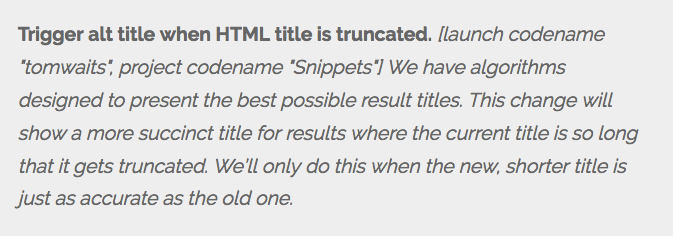
It’s from a post detailing all the algorithmic changes in May of 2012. Yes, they really do release a list of all the changes to the algorithm every month. It’s really not so secret once you get into it and start understanding where to look.
So, having a title tag which is too long can often mean it’s just plain ignored. This means that instead of seeing your beautifully crafted lovely looking title, users see whatever snippet Google has chosen to grab off the page and display.
Your title tag needs to have keywords within it. These are the terms for which you are targeting your page. This is vital for maximising the page's ability to rank. Putting keywords at the start of the title tag has more impact than putting them at the end, so you should start it with the keywords you've chosen for the page.
You need a descriptive title so that users feel confident in the result, and have a good idea of what they will get when they click on it. It must accurately portray what the user will find when they click on the result.
The title should also include your brand within it - for example, the name of the site. This helps the user quickly identify your results and build trust with that result. The more people see your brand the better, so include it here.
So, you need to create a title which is 69 characters or less, includes your main keywords, is descriptive, and includes your brand. It might seem like a lot to put into a short space but it’s very achievable.
Descriptions
So now we have titles sorted out, let’s talk about descriptions These are another key on-page element. They don’t have a direct impact on rankings in the same way the title tag does, but they are still really important. In fact one of the questions we frequently ask when interviewing for SEO positions is “how does the description tag affect your rankings?”.
This has different answers depending on your level of knowledge. The really inexperienced will say that the keywords used within it will help rankings. This is wrong, they don’t. The more experienced will say that the description tag has no impact on rankings any more. It used to years ago but now using keywords within it makes no difference.
However the best answer is that although it has no direct impact on rankings, it does have an indirect impact. This is through the search results where the description tag is displayed.
By having a good description tag, you'll get more clicks from the search results, and a high click through rate (CTR) relative to the ranking position is a positive ranking indicator.
That’s why getting your description tag right is important. So, let's go through how to do just that.
The core elements to remember for a description are:
- Length
- Summary
- Brand
- Call to action (CTA)
Length of your page description
The length of the description is restricted to 156 characters – any more than this and Google will cut words off the end. Of course, this doesn’t look good and can mean that if you include vital information within the text beyond this limit, it won’t be shown.
The description must provide a proper summary of the page.
Stuffing the description full of keywords is not likely to help. Although Google will show keywords relevant to the search in bold within it, as I mentioned, these won’t help you rank anyway.
However if the searcher doesn’t know what they are clicking through to they are unlikely to click on the result and that can damage your rankings. If Google doesn’t think your descriptions are up to scratch it will just replace them with snippets taken from the page content. Incidentally, it will also replace your title tags for much the same reason.
Common reasons for a description being deemed inadequate are:
- It’s just too short
- It’s not unique, for example using the same one on every page of your site
- It doesn’t relate to the content on the page
Avoid these mistakes if you want your beautifully crafted descriptions to show up in the results.
Advertise your brand within the page description
Make sure you include your brand within the description. This reinforces who the result is from and helps to build brand awareness.
Even if someone doesn’t click on the result they are still seeing your ‘advert’ and its branding.
Include a call to action
Including a call to action (CTA) can help increase the click through rate from the search results. More people clicking on the results means more visitors. It also sends a positive signal to Google which can improve your rankings.
A call to action is something which encourages the user to click on your result, for instance: “Compare & Book Now!”

Putting a time frame within it makes the call to action stronger: “Compare & Book Now!” is much more persuasive than simply “Compare & Book”.
So, that's what you need to know for titles and descriptions. In the next unit we'll be covering other on-page SEO elements.